Agile

LayeredBurnDown.jpg

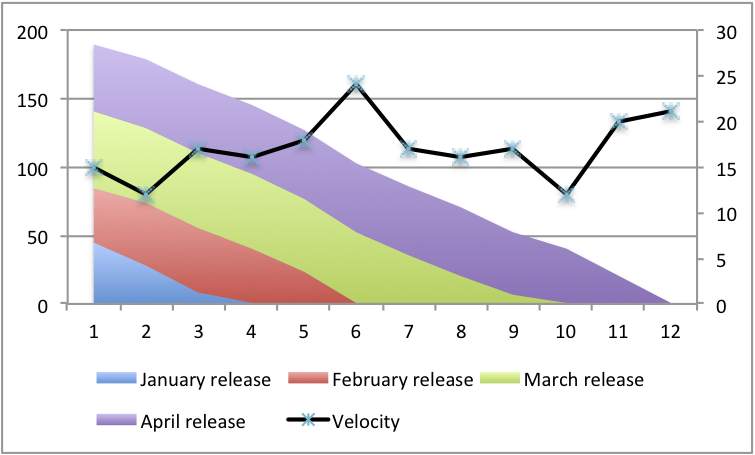
Layered burn-down charts

I’d like to conclude this Burn-down chart mini-series (Burn-downs are not just for Sprints and Advice for creating burn-down) by showing a variation on the classical burn-down chart I created with one of my Cornish clients. I’ve recently been advising an SOA project at another client to adopt a similar approach.

In fact, I’m finding this variation makes even more sense then the original, this is the Layered burn-down chart, here is an example:

I’ve redrawn this example to remove client details. What it shows are three things:

  • First the classic burn-down, just look at the overall line declining.
  • Second the velocity line as described in my earlier blog
  • Third the different colours layers show different releases, let me explain…

This company had taken the product backlog and divided it into monthly releases: November, December, January and so on. By the way this was physical on cards and each month’s cards were held together with a bulldog clip.

The contents of a release can – and would – change. But the company felt it knew what it wanted and since the team knew their velocity they could take a stab at which release it would be in. If something new was added the question was simply: when in which release do you want it? And the related stripe on the chart would increase.

That by the way is why the three strips of work yet to do are approximately equal size. If one grew it was obvious, work needed to be removed – either thrown away, or moved to another release, perhaps one that didn’t appear yet.

This was fairly straight forward when the company (thought) it knew everything to be done and ball-pack estimates could be given. With my SOA client they don’t know what the future holds but they can produce a striped chart for the work they do know about. In their case I’m suggesting every stripe represents a requested service rather than a release.

As new services are requested, and estimated, extra stripes can be added to show the total work required. Together with the velocity and slope it should be easy to see when a service will be available to their customers.

Layered burn-down charts Read More »

Advice for creating burn-down – and other capacity measurements

Continuing from my last blog entry (Burn-downs are not just for Sprints) I’d like to offer some advice on the subject, burn-downs, cumulative flow diagrams, velocity, etc..

1) Don’t track hours. Hours are input and its better to measure outputs. Hours are subjective, see my Humans can’t estimate tasks blog. Worse still we have too many psychological hang-ups about hours to make them usable. Instead you want your own currency, call them story points, abstract points, nebulous units of time or what ever you like. Having your own currency allows it to adjust to your team.

Each team has its own currency. Its like having the dollar, euro and pound. They all float independently, there is an exchange rate but it changes.

2) Draw your graphs by hand, process your data by hand. Get a feel for your data. Unless you have a feel for the data and an understanding of how it comes to be you can’t reason about it.

When I say “by hand” I allow you to use Excel (or similar), graph paper is better, but whatever you use don’t use a tool like Rally, Version One, etc. because you won’t have a feel.

Jack Kilby, co-inventor of the silicon chip and pioneer of the electronic calculator, lamented that his invention(s) deskilled engineers. Before the calculator engineers used a slide rule, this meant the engineers needed to know where to put the decimal point. They needed a feel for the data. Kilby lamented that the calculator meant engineers didn’t have the same intuition because of the calculator and led them to make mistakes elsewhere.

4) Use estimated data, forget actuals: estimates and actuals are apples and oranges, or rather, they are future facing estimates and retrospectives estimates.

Estimate tasks just before you do them (e.g. iteration planning meeting), put ball-park estimate on stories which you aren’t going to do any time soon (i.e. later than this iteration), and use averages for really long term stuff.

When you break the stories into tasks, or epics into stories, don’t expect the numbers to match. In fact, you might want to track the variation for longer range forecasting.

5) From 2 & 4: if you have a time-tracking/time-sheeting system leave it to one side, let it exist in its own little fantasy bubble. Don’t use the data, its toxic – see my entries on Capers Jones work. Live by your velocity measurements and charts.

Ultimately, burn-downs are about capacity measurement: John Seddon in Freedom from Command & Control talks about creating capacity measurement charts within organisations. The various graphs we use in Agile are our version of capacity measurement. Accepting its about capacity measurement means its not about targeting. Targeting is wrong see my entry form last year – Velocity targeting and velocity inflation – for more about this.

Advice for creating burn-down – and other capacity measurements Read More »

SimpleBurnDown.png

Burn-downs are not just for Sprints

One of the key tools in Agile is: make things visible. When you can see the thing you can share the thinking and reason able it.

Capacity charts – usually burn-down, burn-up or their cousins Cumulative Flow Diagrams – are amazingly useful things. They show you the state of a development effort. They show this in data. Data by itself is hard to reason with but put it in a graph and wonderful things happen.

It has recently come to my attention that what I thought was obvious about these charts isn’t. So this blog entry, and maybe a few more to come, I plan to discuss charts, and specifically burn-downs, in a bit more depth,

I always encourage, sometime coerce, teams into produce some graphical tracking of their work. For someone like me who’s favourite tool is an spreadsheet this is a piece of cake. But have to remind myself that not everyone finds this so easy.

Importantly there are two burn-down charts you might want to create: a Sprint burn-down and A Product Burn-down. It should be immediately obvious that these correspond to the Sprint Backlog and the Product Backlog.

Just to be clear:

  • Sprint based burn-down chart which shows the progress in the current sprint towards completion of all scheduled work and shows work on a day-to-day basis.
  • Product based burn-down chart which shows progress through some larger quantity of work, e.g. project, release, milestone. These are updated on a sprint to sprint basis.

Superficially both types of chart look the same, the difference is in the X-axis – Sprint based charts have days, product based ones have iterations. An example will help:

Now I’ve never found sprint based burn-down charts very helpful. Perhaps because my background is working on large development efforts which take months or even years to deliver I rarely see an actual delivery at the end of a sprint. We may have something to show but its only a step on the way to something bigger.

Or perhaps its the economist or statistician in me, trained never to read too much into one set of data figures, and I know we can all have bad days, so I don’t see the point of acting when yesterdays velocity falls.

But I know some people do find value in sprint burn-down so I don’t object if you want one.

However, I always see Product Burn-down charts as vital.

Except on the smallest pieces of work there will be something coming next and a product burn-down can give a good sense of context, overall progress and, most importantly, when you could be finished – especially important on large pieces of work. Armed with this information you can construct sensible release plans.

I recently came across two teams at different companies who had burn-down charts but the charts only covered the iteration (sprint). This seemed wrong to me, it doesn’t tell me much. On closer examination the explanation become clear: the product backlog for both teams wasn’t in a state you could use for a burn-down.

Now if you are taking a truly evolutionary approach this isn’t a problem, you re-evaluate iteration-to-iteration. But actually, few teams take a completely evolutionary approach and these two teams where far closer to the iterative style (i.e. they had original requirements documents to work from).

The lack of a longer-term burn-down was a problem and a sign of a bigger problem.

One enhancement I like to make is adding velocity to the burn down chart. Take this one for example:

This adds a second axis (in Excel you have to hunt around for this option) which allows you to see the team velocity sprint-on-sprint.

The key thing is, without this data, velocity and burn-down – and the graphs to understand it – each sprint exists in isolation. That might be OK if you are delivering every sprint and you don’t need to peek into the future. But the kind of work I see does need to look forward and this information is essential.

Finally, I’ve most of what I’ve said about burn-downs applies equally well to cumulative-flow-diagrams (CFDs). In fact I prefer CfDs and readily use them over burn-downs because they help show how work increases. However, I have also discovered that CFDs are not only harder to construct and update but also harder to explain to people. There is something obvious about burn-downs.

Anyway, you pays your money, you takes your choice. Its up to you.

Burn-downs are not just for Sprints Read More »

Propogation delays

Propagation delays occur when there is a chain reaction, a sequence of reactions which take time to work down the chain. Think of a line of traffic waiting at the red light. The light turns green: the driver of the first car doesn’t move instantaneously, it takes a moment to registers the change, perhaps move the car into gear or take the hand break off, moment to press the accelerator and a moment for the engine to start moving the car.

The second car in the line might be watching the traffic light but they are also watching the car in front. Only when the break lights (if on) go off and the car begins to move can they move. And so on.

It takes time for the change to work its way down the line.

The same thing happens in integrated circuits, silicon chips. Even electrons take time to move. Reducing propagation delays is one of the ways chips get to go faster.

Once you know about propagation delays you start seeing them everywhere. Increasingly I not only see them in software development teams but I talk about them. But not everyone knows the concept, hence this blog.

Propagation delays occur when one team, or one developer, changes some code, or perhaps a database schema, and it takes time for all the other team members to update their code base and make any resulting changes.

Propagation delays occur when a company decides to start doing something, or stop doing something, and it takes time to work down the chain and to actually stop or start.

Propagation delays cause tension because different people, or teams, are working to different assumptions.

As with chips and traffic reducing propagation delays can speed things up.

Propogation delays Read More »

Updates for Dialogue Sheets

Two dialogue sheet updates today.

Firstly I’ve created a mailing list to make announcements about dialogue sheets and for discussions about the use of dialogue sheets. This list is open to all and is hosted on Google groups (so you need a Google account).

Second, I’ve uploaded a new dialogue sheet. Another retrospective sheet this one is designed for use at the end of training course. I’ve used it at the end of several Software Strategy Agile training course and it has been well received. This sheet fulfils three purposes:

  • It allows participants to experience a retrospective
  • It provides for a retrospective on a training course at the end of the course
  • It introduces dialogue sheets as a technique for retrospectives

Although the sheet was intended specifically for use at the end of an Agile training course there is little that is specific to Agile in it. I’d really appreciate feedback from other trainers who try this sheet.

As usual, all this is at www.dialoguesheets.com.

Updates for Dialogue Sheets Read More »

Dear client, the truth about software development

Dear Customer,
I think its time we in the IT industry came clean about how we charge you and why our bills are sometimes a bit higher than you might expect.

The truth is, when we start and IT project we just don’t know how much time and effort it will take. Consequently we don’t know how much it will cost. This isn’t a message you like to hear, particularly since you can be absolutely certain that you know what you want.

Here in lies another truth, I’ll try and put it as politely as I can, you are, after all, a customer and really I shouldn’t offend you. The thing is, you don’t know what you want. O yerh, you know in general (usually) but the devil is in the detail. And the more you try and give us the detail before hand the more likely it is to change. Each time you give us more detail you are offering more hostages to fortune.

Just to complicate matters the world in uncertain. Things change, companies go out of business, customer tastes change, fashion changes, Governments change and competitors do their damnedest to make life hard.

Yes it is true we can sometimes gold plate things. Yes some of our engineers like to do more than needed, and yes we have vested interest in getting things added so we can charge you more.

It is also true that you have add things: you quite legitimately think of things after we’ve begun, you quite naturally assume something is “in” when we assumed it was “out” and you also try and put one over too.

(Lets not even talk about bugs right now, it just complicates everything.)

Frankly, given all of this it is touching that you have so much faith in IT to deliver. But then, when IT does deliver, boy, does it deliver big. Look what it did for Bill Gates and Larry Page, or Jeff Bezos of Amazon, or FedEx, the list goes on.

So how do we ever talk you into this?

Well, we package up this unsightly mess and try and sell it to you. To do this we have to hide all this unpleasantness. We estimate how much time we think the work will take, actually these “estimates” are little better than guesses; human’s can’t estimate, most companies don’t have historical data and for those that do have data most of it is worse than useless.

So we get this guess, sorry estimate, and double it. Well maybe we double it, we might treble it, and when we see the new number, if it looks too much we might reduce it. And then we work out whether you will pay it.

That might sound awful but remember: we could have guessed higher in the first place.

Anyway, we don’t know which number is “right” but to make it acceptable to you we pretend it is certain and we take on the risk. We can only do this if the number is sufficiently padded. And even then we go wrong.

If the risk doesn’t happen then we get a fat profit, if the risk comes to pass we don’t get any profit, maybe we make a loss, and if its really bad you don’t get anything and we end up in court.

Really its all a question of risk: we try to present a clean, low-risk solution to your problem, and in doing so we take on a lot of risk. The alternative is that you take on the risk – and the mess – and do it yourself. (Unfortunately, another sad truth, is that as far as anyone can tell in-house IT is generally not as good as specialist providers so if you do decide to take on the risk you actually increase it.)

There really isn’t a nice simple solution to this, you have to work with us on this.

Thats the first part of the solution: you, the customer, have to be prepared to work with us, the supplier, and work with us again and again. This will reduce the risk.

The second part of the solution is: you need to be prepared to accept the mess and share the risk with us. If you aren’t prepared to take on any risk then we will take it on, and we will charge you for it, and since the risk is a lot we will charge you a lot.

Sharing the risk also has the effect of reducing the risk. Once you share the risk you have a motivation to reduce it.

If you are prepared to accept those two suggestions then lets press reset on our relationship and talk some more.

Dear client, the truth about software development Read More »

Is "Faster Better Cheaper" axiomatic in Agile?

“Faster Better Cheaper” – a cry heard often from management types!
Or at least engineers think thats the sort of thing managers say. Personally I don’t think I’ve ever actually heard a manager say it but I have heard engineers say managers want it “Faster Better Cheaper” with scorn in their voice.

The idea that you could have it (whatever it is) “Faster Better Cheaper” seems to have gained popularity when Daniel Goldin was the head of NASA. As many engineers, including myself, are quick to point out the original quote was “Faster Better Cheaper, choose two”. I say “original quote” but I have no idea who said it first, WikiQuote doesn’t help, and Google doesn’t shed much clear light. (Anyone out there know?)

Whatever, last week, I heard another engineer-type say that he believed management wanted “Agile” because it was “Faster Better Cheaper” and, not for the first time, it got me thinking. Is Agile Faster Better Cheaper?

My knee-jerk reaction is “No!” but the more I think about it the more I think it might actually be so.

Firstly, Faster than What? Better than What? and Cheaper than What?

Presumably “Faster than traditional Waterfall development”. Or at least, what-ever-it-is-you-are-doing-now, which is probably to some degree based on waterfall.

In the short run, when a team are first changing the way they work thy are quite likely to go slower than they would do otherwise simply because they are learning something new and not using a set of practiced reflexes.

Agile most definitely promises to deliver something sooner – if you want it, plenty of business folk seem unhappy with getting things too soon or too often. But Agile will NOT deliver the whole thing Faster, it can only promise to deliver a part sooner.

The logic of Agile recognises “You will change your mind when you get something”, meaning, if the business/customer sees part of the final thing they will add, remove and change the thing they originally asked for. In some cases, and I have seen this happen, they remove work. Lots of work.

Thus, the whole might come faster, but the whole is smaller than the thing you thought it was.

So, Faster – in the short run no, in the medium run you should get something sooner, and in the long run, Yes, it will look like Faster.

What about Better? – how are we to define better: better quality (fewer bugs), better suited to need, more fully filling the initial request.

Yes: Agile promises better quality (fewer bugs). Indeed if you don’t improve quality and remove bugs you are going to have problems doing Agile. If you do improve quality – fewer bugs – then the evidence suggests you will have shorter schedules, i.e. you will go faster.

Better suited to need: again, Yes. If those who made the requests are seeing something sooner, and having their views on functionality taken into consideration then one would expect the final product to be better suited to need.

More fully filling initial request: No, complying with “better suited to need” means we are not aiming to build the thing we first thought of but rather build the thing we need to satisfy the need.

So, if your criteria for success, for better, means complying with a requirements document that was frozen at some arbitrary point in time then No, Agile falls at this hurdle.

Cheaper: again there is a short run and a long run dimension here.

In the short run the development team need training, coaching and time to practice. Of course you could skip the training and coaching (plenty of teams do) but that means they will need more time to practice (make more mistakes, go down a few dead ends, etc.) Practice time costs.

In the short run I don’t think Agile is cheaper. Indeed, in the short run, if you are doing it properly you will see expenses rise as you have the likes of me come to train and coach your teams. (If you are not doing it properly you probably won’t see your costs rise but they will all the same as teams (slowly) learn by themselves.)

In the longer run, when you’ve finished the training, coaching and when the team are proficient then those extra costs will be gone and you should be cost neutral as least. But if you are not writing, finding and fixing so many bugs, and if parts of the requirements are being left undone – while satisfying your business customer – then costs should fall because you are expending less effort and doing less work.

Even if you are not doing less work costs should fall because on a software project costs are dominated by the number of people you have multiplied by the time you have them. If you are going faster then time is reduced and costs come down.

Therefore the project will be cheaper.

Summary: Better (fewer bugs) provides for Faster (delivery) which results in Cheaper (software).

Agile is “Faster Better Cheaper”, QED.

When you put it like that “Faster Better Cheaper” looks axiomatic over the long run.

The engineer in me hates this conclusion, I’m not prepared to accept it but if I follow the logic it is true. (The engineer in me would love someone to find a flaw in my logic so please go for it! Shoot me down!)

Note the three assumptions in this logic:

  • The reference point is the “Waterfall” model of development
  • Your definition of better considers a low-bug count important and emphasis fitness for purpose over conformance with initial requirements
  • Your are prepared to spend in the short run for quality (defect prevention) to save in the long run

How can we explain this? (Notice the change from ‘I’ to ‘We’, I’m pulling you into the conspiracy.)

Well, if this is true then its not so much that Agile is “Faster Better Cheaper” but that the model we are comparing it with – the traditional (“waterfall”) model – is so utterly broken.

Waterfall breaks Faster Better Cheaper everywhere:

  • Waterfall leads to large batch sizes and economies of scale thinking: in software development there are dis-economies of scale so large batch sizes makes everything slower
  • Waterfall project managers believe quality (bugs) can be traded off against time but actually the opposite is true. Reducing quality reduces “better” and slows a work down. The same project managers are trained to resist requirements change so almost guaranteeing business customers will be dissatisfied with what is delivered and consider it “worse.”
  • Slowing software development down makes it more expensive, remember: Cost = People x Time

Its not so much that Agile is a good model but that the competition is hopeless. It isn’t even a fair comparison. My belief is that Waterfall never really worked anyway, so comparing Agile to Waterfall is a false comparison – bang goes a big assumption.

In which case the, returning to the original question: “Is Agile Faster Better Cheaper?” the answer is really “Depends on what you are comparing it to.”

Is "Faster Better Cheaper" axiomatic in Agile? Read More »

Dialogue sheet observations

Regular readers will know I’ve been pushing Dialogue Sheets as a new retrospective technique. I have observed a number of dialogue sheet sessions – both the retrospective sheets I’ve made public plus some other sheets I’m still testing. Someone from Motorola Mobility recently asked for my observations on using dialogue sheets and I thought it would be a good opportunity to make my observations public.

As a facilitator I find there is very little for me to do, the sheets are designed to be used without a facilitator. As an observer I have been asked to intervene occasionally. Usually I try to say nothing, if the group is willing they can usually work out what to do themselves. When people in the group are either suspicious (something new) or unsure about the retrospective they usually need a few words of explanation.

The most common sticking point is Kerth’s Prime Directive. Some people seem unwilling to accept it for the duration of the retrospective. They start making comments about how they don’t think people did not do their best.

I don’t like stepping in when this happens because I think the group needs to come to an understanding themselves. This eventually happens even if it is something like “well we kind of ignore that” but it can take a while.

The second thing I have noticed is time: It is not how many questions there are on the sheet that determine how long the retrospective will take but the number of people involved. When there are 4 people it is quite fast, when it is 8 it takes longer. So far I haven’t found a good rule of thumb for determining just how long the sheet will take.

Sometimes I intervene to just remind people of the time and move them along.

The other bit which can be difficult is the end questions. They are intended to bring the group to set of conclusions which they can act on. Still sometimes the items are “Better communication” which while right isn’t very specific or actionable.

There have been plenty of dialogue sheets downloads now and I occasionally e-mail downloaders for feedback. Of those those who have used the sheets “energized” is the most common comment.

I’m planning to revamp the three existing sheets and add one for project start-up. I’ve also had a request to translate them into other languages – specifically German. Once the revamp is complete I’ll start on some translations. I’m also thinking of creating a mailing list for discussion dialogue sheets.

If you haven’t looked at the dialogue sheets they are free for download, and you can buy pre-printed dialogue sheets.

Dialogue sheet observations Read More »

Xanpan1.jpg

Xanpan

For a little while now I’ve been quietly talking about my new Agile method. The clue is in the name: Xanpan – pronounced “Zanpan”. Most obviously Kanban and XP (Extreme Programming), its a fusion.

Its not so much than Xanpan has any new radical ideas in it, its more than it is a synthesis of ideas from several Agile methods plus my own. It contains a fair chunk of what I would call “product management ideas”.


Xanpan is a little more than that, in takes from Scrum as well as XP, and from Lean as well as Kanban, plus there are other ideas in too.

I’ll write more about Xanpan in future but for now here are the essential features, and where it steals them from. A little rough and ready but I wanted to share this and get some feedback.

From Extreme Programming: The technical practices

  • Test Driven Development plus Automated Test Driven Development. If you want to adopt BDD then go right ahead
  • Lightweight, near time code review, better still pair programming if developers are happy with it
  • Continuous integration: with tests and static analysis tools as part of the build system
  • Rough up front design: no up front design is wrong, but so too is design that takes weeks or months. If you need a design session it is probably part of the planning meeting with all the developers around the whiteboard for an hour or maybe two
  • Refactoring to keep the code soft – its software, emphasis the soft
  • Shared code ownership
  • Minimise documentation, accept tacit knowledge as part of the development process.
  • Velocity measurement and “yesterday’s weather” approach to deciding what to put in the next iteration

From Kanban: Process flow

  • Have a visual board to track progress
  • Divide the board into columns which represent you process – probably more than just: Todo, In Progress and Done. Columns are usually come in pairs: a queue then a action which draws from the queue. Work to improve the flow and change the columns as you go
  • Work in progress limits – usually on action queues, occasionally queues may be limited too
  • Improvement comes from improving flow
  • Minimise the time spent estimating, if possible abolish estimates and use statistically derived approximations, i.e. averages
  • Cumulative flow charts

From XP / Scrum: Process rhythm

  • Use iterations to establish a regular rhythm to the team
  • Iterations start with closing the previous one: review work done, update statistics, conduct a retrospective. This is followed by a planning meeting: work is presented, estimated (if need be) and scheduled
  • Stand-up meetings where appropriate
  • Burn-down/up charts where appropriate
  • User Stories are the default requirements capture tool although Use Cases, Planguage and more informal approaches are acceptable too. If using User Stories then do not use more than three levels of division

For task management Xanpan builds on Blue-White-Red, which is itself a XP/Scrum fusion.

From Lean: Culture of improvement, Kaizen and Learning

  • Retrospectives are not enough: Leaders should undertake personal reflection
  • Rehearsal: Teams should undertake formal and informal training together; deliberate practice as Kevlin Henney and Jon Jagger like to say
  • Team Coach: Each team should have a coach, different coaches may focus on different things so there may be more than one coach. Except in large teams (over 12 people) and in the early days of adoption the coach is usually not full time on a team. The team is there to help the team adopt practices, learn and reflect.
  • Individuals have multiple skills and should all muck in, but there are specialists in some areas.

Somethings Xanpan doesn’t take:

  • Kanban’s stop the line quality control: sometimes it is appropriate, sometimes it isn’t. Keep regular retrospectives, part of your rhythm
  • Scrum Master: teams will have a Manager or Project Managers, or may be lead by an non-commissioned manager, e.g. Team Leader, Technical Lead, or similar
  • Anti-manager ethos: Management is part of the solution, not the problem. Unfortunately the quality of IT and development managers is general is poor; good management can be really powerful

Something Xanpan doesn’t like but doesn’t outlaw (because it can’t):

  • Matrix management
  • Distributed teams, particularly teams in different timezones

Something I find missing in all Agile methods to date is the right balance between engineering and requirements. Therefore….

Xanpan broadly follows the 10 Step Requirements Model but recognises this model is not broad enough to cope with all scenarios. No model ever will be.

On requirements Xanpan believes:

  • There should be a dedicated requirements role staffed by a trained/experienced Product Manager or Business Analyst; both is probably overkill
  • There should be a clear business case setting out why a team or project exists. The business case is not a shopping list of features, nor is it a large document but it should allow someone to decide the work is finished
  • Customers are not the only stakeholders. Each stakeholder will make their own judgement about the success or failure of work therefore each stakeholder needs to be considered
  • Evaluating the benefits of completed work is as important as deciding what work should be undertaken next. There is no point to developing more software if the software that has been delivered so far is not valuable.

And some more:

  • If the team has an architect they should also code; the architects role is to help create a shared understanding of the architecture and educate less experienced team members.
  • Teams should be kept together and not broken up when work finishes or changes; bring the work to the team, not the team to the work
  • Block and impediments should be tracked to see which ones occur repeatedly. If a team cannot resolve an impediment themselves then the leader or manager steps in, in effect it is the start of an escalation
  • There are three version of Xanpan: Evolutionary, Incremental and Iterative – these build on the ideas in my Agile Spectrum article. Iterative is the most compatible with existing corporate culture and project management methods – salami slice requirements; Evolutionary is the extreme – goal directed working
  • Xanpan adopts the three planning layers described in my Three Plans for Agile article and encourages Goal Driven Projects.
  • Xanpan believe management has an important role to play in the development process (but a lot of development managers are not up to the job)
  • Whenever possible put bug-fixing in a separate stream of work; but staff it with the same people, rotate people
  • Keep teams together: bring the work to the team, rather than the team to the work

Underlying it the Xanpan philosophy is about:

    • Quality is free: automate as much testing as you can, although you probably can’t automate 100%


    • Prioritisation is vital and omnipresent: there is no such thing as too little time, just mis-understood priorities


    • People are key to good software development but there aren’t enough good people to go around, so we need to improve the people we have and help them work more effectively. And we need to grow more good people


    • Agile is not about what you do but what you achieve; measure outputs not inputs


    • You can always improve


    • Customer/End user involvement is key to building a successful system.


    • Xanpan is a pick-n-mix of bits of various development methods and adopters are encouraged to continue the approach


    • No process or Methodology can cope with all situations, and if it could it would be too big to write down or learn, there adaptation is always required and people need to think


  • The process should be changing, if you are doing Xanpan the same in six months as you do today you aren’t doing Xanpan

Xanpan Read More »

AANominated.jpg

Cornwall nominated fror Agile awards

I’ve tweeted and blogged about the Cornwall Agile Programme before – something I like to call the ‘Cornish Software Mines’. So it is with great pride that I’m please to announce that the programme has been nominated for an award.

The Agile awards are presented as part of the Agile Business Conference and ‘Agile Cornwall’ has been nominated under the ‘Best use of Agile in the Public Sector’ – officially the programme is part of the ‘Convergence Programme for Cornwall & Isles of Scilly’ so the nomination is under this name.

This autumn I’ll be delivering a couple of case studies of the programme and the companies which have benefitted. The first of these will be, fittingly, at the Agile on the Beach conference in Falmouth. This isn’t a coincidence, the conference is a spin-off from the programme. This will be the most comprehensive case study as it will include presentations from several of the companies who have benefitted from the programme.

A few weeks later a cut down version of the case study will be appearing at the Agile Business Conference. If you miss it there I’m sure it will have another outing before long.

In the meantime, I’ve posted a case study of the work I’ve done with Sullivan Cuff Software on the Software Strategy website.

Cornwall nominated fror Agile awards Read More »