Xanpan: planned and unplanned work

I’m on my way back from another visit to the Cornish Software Mines. I’ve been with four different companies this week, laid the first plans for Agile on the Beach 2012 conference and got to know Sebastian Bergmann who has been visiting the mines this week working with the PHP teams.

One of these companies is new to the Agile programme, we did training for the entire company last month and this week I was there to get them started for real. This meant we had to design their board layout and talk about workflow. Once again I found myself advocating Xanpan, the cross between Extreme Programming and Kanban.

The board layout – effectively workflow – is on which reoccurs in Xanpan systems and I would like to discuss here. (I’ll explain the layout here and in a second blog entry I’ll post a picture and talk about the future.)

The problem companies/teams face is: they have planned and unplanned work to do. Typically this is some project they are working to deliver but they need to work on support issues – bug fixes – too. I say that, but it is not just support issues, sometimes it is clients who shouts very loud, or managers who can’t say no, or customers who refuse to wait a few days – indeed sometimes to do so would be the wrong thing to do.

The Scrum answer to this is to stamp on the unplanned work. The team are locked – remember commitment and Sprint-goal. This unplanned work is a problem the Scrum Master should stop – or declare Abnormal Termination of Sprint. Particularly in small companies this isn’t a very useful answer, the truth is, things are more complicated than that, planet-Scrum is too simple.

The ultimate solution is to look at the reason these unplanned items are arising and try to address the root course. In time it might well be possible to do that but right now we don’t want to block the team’s transition. Even in the long term this might be the way of the world for such a team.

The Kanban answer would be to go in the other direction: run all work as “unplanned” and just restock the to-do queue as needed. However this robs the team of the rhythmic certainty of a Sprint. Many of the teams I see need to move away from seat-of-the-pants decision making and knee-jerk reactions. Adopting regular iterations builds in decision making points and helps individuals understand their roles.

So: Xanpan, keep iterations/sprints but allow for unplanned work. To do this we design a board which begins with the three columns:

  • Planned
  • Unplanned
  • Prioritised (usually this queue is limited)

The next column is usually something like:

  • WIP: In development (usually WIP limited)

The team start Springing as usual: they hold a planning meeting, review Blue Cards (Business requests, User Stories) and if necessary break them down to White Cards (tasks). These then populate the Planned column. These blues are probably drawn from a traditional product backlog.

At any time work can be added to the Unplanned column. The column is unlimited.

A few minutes before the morning stand-up meeting around the board the person with authority populated the Prioritised column reviews and populates it. This could be the Project Manager, Business Analyst, Team Leader or someone else, the role and title doesn’t matter, what is important is that this person has the authority to do this. On one team this was the joint responsibility of the Project Manager and Business Analyst.

This person looks at the work still in the Prioritised queue, and they review the Planned Work and Unplanned work. From these sources they decide the priorities for today. When the team gather they can see what the priorities are. For the sake of simplicity it normally makes sense for the Prioritised queue to be limited and for the priorities to be ordered: 1, 2, 3, up to the limit.

If need be priorities can be changed during the day: maybe something even more urgent arrives – or goes away, maybe the prioritised queue empties, or some such.

Effort estimates are normally assigned to planned work during the planning meeting. For unplanned work some teams don’t both adding estimates, some added a quick estimate from the person who picks up the card when they pick it up and some put an effort estimate on when it is complete.

Importantly, the original source (planned or unplanned) is recorded on the card – maybe a different colour card, maybe a dot, a word, whatever. At the end of the Spring the team can review how much planned and how much unplanned work was undertaken.

Thats it really: planned, unplanned and prioritised. The first two are effectively queues for the third. Somebody, or bodies, are responsible for balancing priorities.

It is possible that this workflow/board layout is actually a transitional layout. After running with this flow for a while there will be data on how much unplanned versus planned work actually occurs.

Xanpan: planned and unplanned work Read More »
Retrospective Dialogue Sheets: feedback & updates 2 of 2

This is the second of two blog entries about the use of dialogue sheets. The first entry contain some simple statistics and findings from recent experiences and feedback from users. This entries discusses a few findings which deserve longer comment.

Those who use the sheets consistently report that they engage more team members (everyone gets to speak). Several people report that quieter team members are more likely to contribute in a dialogue retrospective than in a regular retrospective.

Another common finding is that energy levels are higher, there is more discussion and removing the facilitator changes the focus of the retrospective.

These are the results I hoped for when I created the sheets. Yet, to some degree I think these findings are simply the result of changing the format – doing something different. Perhaps a team that uses dialogue sheets for every retrospective will find that in time some of the energy is lost.

Right now I don’t know, I don’t have enough not enough data. However, I have always said these are one technique and I encourage you to use them as one for several retrospective approaches.

A few people report that they don’t like the idea of removing the facilitator. This dislike has stopped them from trying the dialogue sheet. While I understand this fear I hope they will try them all the same. After all, it is the nature of Agile to experiment.

My advice: try a dialogue retrospectives and see what happens, then decide if you want to try again.

One person did report that they felt that without a facilitator some issues were not explored as they might be. I fully understand this finding although it does cause me to ask: were some areas explored which might not have been explored? Again this could be a argument for having some facilitator-less retrospectives and some with.

There is a strange case reported from a company I will not name. Here the management vetoed facilitator-less retrospective. My correspondent doesn’t understand why and I am a little baffled. This gets curious when you know the name of the company concerned. Someone else from the same company replied independently (different country) and has had success with the sheets. I’ve put them in touch and hope this will be resolved.

Interesting, a previous correspondent told me that they kept a facilitator even when using the retrospective dialogue sheet. This hybrid could address both management concerns and the fear of missing topics. I think there is more experimentation to be done here, perhaps using the dialogue sheet to start the retrospectives and then having a facilitator follow up. Or using a dialogue sheet retrospective to identify issues and in following retrospectives deal with them in detail.

Finally, two unexpected findings which carry lessons for those doing regular retrospectives.

All the retrospective sheets include Norm Kerth’s Prime Directive:

“Regardless of what we discover, we must understand and truly believe that everyone did the best job he or she could, given what was known at the time, his or her skills and abilities, the resources available, and the situation at hand.”

To retrospective facilitators this is a holy commandment, something we hold close to our hearts. Yet left alone it is interesting to see how groups react to it.

While one corespondent reported “Kerth’s prime directive is also in our company’s culture, therefore there is no need to remind people of it, it comes natural for us.” Another reported:
“One group poked fun at the “prime directive”, but the other didn’t”.

My own experience is similar. Some teams – usually those who are familiar with the directive – just accept it. One team commented that although they knew it they tended to forget it and it was a good reminder. However, several teams have agonised about the directive, they stall at what should be a routine reminder. Sometimes it is obvious that team members implicitly do blame individuals for problems they face.

I think this behaviour says something about the company, the culture and the teams familiarity with conducting retrospectives. It is, perhaps, the one place where I would like a facilitator on hand. However intervening at such an early stage in the sheet would compromise the approach.

Perhaps the lesson here is that the dialogue sheets work best when teams have trust, and accept the Prime Directive. But then, isn’t that true for all retrospectives?

The other lesson is: while retrospective facilitators hold Kerth’s directive close to their heart the same isn’t true for many others.

The second unexpected finding came at a company in the North West of England. I visited and observed a retrospective using dialogue sheets. There were over a dozen people so we divided into two groups each with a retrospective dialogue sheet.

Unusually the two teams used different sheets – I think one had a T1 and one had a T3, so a similar format but slightly different questions. The first, finding here was that using different dialogue sheets not only does work but can help add insights.

The second, much more significant and unexpected finding was a result of who joined each group. I thought I had divided the groups randomly but as it happens the majority in one group were developers and the majority in the other group were Business Analysts.

At the end of the exercise one of the Business Analysts commented: In a normal retrospective the developers dominate (there are more of them) and so the retrospective usually talks about issues of concern to developers, the issues of concern to BAs are not usually discussed.

It sounds obvious once you see it: the largest group will tend to dominate a retrospective.

However, separate them out, as we did here, gives both groups an opportunity to talk about their concerns. Now the really interesting bit.

The two groups were retrospecting the same time period, however they approached it from different points of view. Some of their conclusions were different but some were the same. To my thinking, when different people, coming from different starting points come to the same conclusions, then those conclusions have added weight.

Overall then: Retrospective Dialogue Sheets are a success.

Retrospective Dialogue Sheets: feedback & updates 2 of 2 Read More »

Retrospective Dialogue Sheets: feedback & updates 1 of 2

Every couple of months I e-mail everyone who has downloaded one or more of my Dialogue Sheets to get some feedback. Getting feedback is why I make people register to download a Dialogue Sheet – sorry, I know some people don’t like doing this, and I know some people fake their e-mail addresses but unless I do this I get very little feedback.

I’ve blogged about my Retrospective Dialogue Sheets before but I thought this would be a good opportunity to update readers with some feedback and findings. This is the first of two posts on this subject, the second post will examine a few findings in more depth.

First simple facts and comments:

  • 40% of people who download Retrospective Dialogue Sheets do retrospectives rarely or at best every six months.
  • Many who download them and reply to my requests for feedback say “Sorry we haven’t used them” and I guess that many of those who don’t reply haven’t used them either. Given that I expect those who are interested in retrospectives will download, and given that downloaders are measured in hundreds, not thousands, this indicates that actually doing retrospectives is rare.
  • 46% of downloaders do them once a month or more frequently, while 15% of downloaders classify themselves as Retrospective Facilitators and perform any retrospectives.
  • 25% of downloaders are in the USA, 9.5% in the UK, just ahead of Germany (9.09%). Otherwise only India (5.79%) tops 5%. Though Holland, Canada and France all score 4.5%. I don’t find this surprising given the spread of software development internationally and the spread of dialogue sheet publicity.
  • A few people find the sheets too complicated, a few people find them too simple. I had hoped that a variety of sheets would address both ends of the spectrum: the lesson for me is to create some even simpler sheets.
  • A couple of people have reported that they don’t feel their team is open enough to use the sheets. My guess is this will present difficulties for any type of retrospective.
  • A few people say the sheets are too expensive to print: the print on demand services charges about $40 dollars, the expense is in the postage rather than the printing, if you order a lot the price per sheet is a lot lower. (I must find a European print on demand provider.). However 40% of people say that they have a suitable printer, this surprises me a bit, I never expected large printers were so common.
  • To my surprise a couple of people have said there is not enough space to write on the sheets! I will create some new sheets with fewer questions and more space.
  • A few replies say that the teams are now using the sheets regularly, and in some cases they have spread from Agile to non-Agile teams.

As I said, one common response is that downloaders have “not had a chance to use the sheets yet.” On the whole I assumed this was down simply not having a retrospective. However a few correspondents have hinted that their company has a prescribed retrospective process. This worries me, if the retrospective approach is prescribed in such detail I wonder how much else is prescribed and how much opportunity there is to change things.

I’ve also been asked if it is possible to customise the sheets. The short answer is No, because they are PDFs its kind of difficult – although I’m sure you could with the right tools. Still there is no reason why not to create your own – a few correspondents say they are thinking of this. (Anyone thinking of creating their own sheets might find this guide for teachers creating dialogue sheets useful.)

Finally for this entry, I’m also hoping to provide translations of the sheets shortly. I have offers of translations into Spanish, German and Finnish – plus I hope to persuade a friendly Russian to help. Main problem at the moment is getting the raw files out of OmniGraffle into Visio.

Retrospective Dialogue Sheets: feedback & updates 1 of 2 Read More »

You are not Steve Jobs (and don't try to be him)

Many people better than I have commented on the passing of Steve Jobs a few weeks ago, I too was sorry to see him go. He touched my life (indirectly): I’m writing this on a Mac, we have an iPad in the house, I might not like iPhones but my new Android phone clearly owes a lot to Jobs vision (i.e. it is a copy).

Reading, watching and listening to the many obituaries about Jobs I started to get worried. My concern is simply that Jobs was not a good role model. His phenomenal success guarantees that more than a few people will attempt to emulate him, in so doing they will sow the seeds of their own failure and make the lives of their employees miserable in doing so.

Here are a few examples.

Jobs was a perfectionist: products didn’t get launched unless he approved of them. However, being a perfectionist is something of a luxury, Apple existed, had revenue, had a brand. If you are a start-up perfection is just too expense.

Jobs started the MacIntosh project because he had Lisa taken from him: MacIntosh and Lisa could only exist because Apple had revenue from the Apple II line.

The first Macs were far from perfect; the team undoubtedly learned from Lisa – what we might call a pivot in Lean Start-Up terms but not quite that clean cut.

Jobs demanded the first Macs would work in 64k, the team knew it needed 128k and Jobs, late in the day gave in. Secretly the team engineered the Mac to accept 512k which is what it really needed.

The moral of the story: there is more to it than being a perfectionist. Even perfectionists need to compromise sometimes. Surrounding yourself with good people helps.

More recently the original iPhone was launched as a 2G GSM phone, without features like cut and paste. It seems incredible now. Apple launched an under-spec phone and refined it in the market. Which leads us to….

Jobs would spurn products/employees who he didn’t think were up to scratch: if employees are loyal to the company and to you, and if you have a deep talent pool, and (perhaps) the stock-options are worth a lot you might get away with this. Otherwise its a sure fire route to staff turn-over.

Jobs may have been a perfectionist but, it seems to me, he wasn’t a perfectionist about quantity of features, quite the opposite. Apple products are simple because they lack so much, once launched they are refined and elaborated in the market.

Jobs didn’t use customer understanding or focus groups to tell him what the public needed. He was a visionary who just knew. This is perhaps my greatest fear: to read some of the obituaries is to condemn the whole discipline of Product Management to the dustbin in favour of senior managers who know what is right for customers – a disease too many companies suffer from.

This argument doesn’t stand up. Jobs was an, perhaps unique, visionary who did understand what customers wanted. He had an ability to see what technology could do and how people could use it. Few of us are blessed with this ability. Thus we have the discipline of Product Management to help us.

Jobs may have shunned market and customer research but his Product teams didn’t. In some cases Apple conducted internal, closed, demonstrations of new products; they used their own staff for research. And, as I just said: Apple launched products and rapidly refined them in the market.

Apple also had many products which were not hits, with and without Jobs: Apple III, Lisa, Newton, Mac portable, Pippin, Apple TV, A/UX, Pink, MobileMe – the iPod took several years to break through and even the Mac came close to failure on several occasions – and iTunes is probably the worst piece of Mac software on the market.

OK, Jobs was not even at the company when several of these products launched but he sowed the seeds and above all it was his company, a culture he had created. And while he wasn’t at Apple he founded NeXT which wasn’t exactly a success either.

But look again: Apple and Jobs were prepared to try things. Some worked, some didn’t. Some took a long time to come to success. Some failed but somewhere, in Jobs head, deep in the bowls of Apple, lessons were learned for future products. We will never know just how much the Mac team learned from Lisa, or how much MacOS X learned from Pink, or even how much the iPad learned from Newton.

Apple and Jobs could do this because they had deep pockets, they had revenue.

Lets put this simply: as much as you might like to think you can emulate Steve Jobs you probably can’t. What worked for Jobs worked for him because he was unique in vision, timing and experience. Just because Jobs could ignore volumes of business advice, armies of experts and accepted wisdom doesn’t mean you can.

The lesson I would take from Jobs and Apple is not about perfectionism, design, arrogance, or the super-CEOs but about the willingness to try something simple, iterate and refine in the market.

You are not Steve Jobs (and don't try to be him) Read More »

Agile will never work in Investment Banking

In the past I’ve worked for banks, as an employee, as a contractor and as a consultant. And I’ve worked for companies that supply banks in one way or another. And I have lots of friends who work for banks and tell me stories. While I’m not an expert on banks and banking I know a little….

One of the things I know is that modern banking – in all its forms – is highly dependent on IT. Banks spend a lot of money on IT and develop a lot of their own software. As a result they have a lot of software developers. And I also know that quite a few of these developers and their teams have been, and are, experimenting with Agile working in one way or another.

It seems every bank has pockets of Agile, a team here, a team there. And not very often joined up.

Some of these teams are successful, some are less so. They often find themselves battling against big company / bank culture. The banks seem to be very good at killing their Agile teams: they get disbanded, forced bank to traditional (pseudo-Waterfall) approaches by bank procedures, or constrained by “the way we do things here.”

It also seems – notice we get further and further from fact and more into conjecture as I build this argument – that many banks have cottoned on that Agile is good and can help them. To this end many banks (and this is fact) have established Agile support programmes of one form or another. There are people at many banks who are trying to make the bank Agile – at least in software development. For many of them it is an uphill struggle.

At this point we should differentiate between retail banking – what you do on the high street with your bank – and investment banking – or casino banking if you prefer. (Yes there are other divisions but lets limit ourselves to two.)

In retail banking I think there are grounds to be a little optimistic. The stories aI hear are that Agile pockets are having success and things are gradually, slowly, improving and the efforts to link things up are slowly bearing fruit.

In investment banking I’m very pessimistic. I have come to the conclusion that while individual development teams may be successful at Agile for a while inside an investment bank all such teams are ultimately doomed. Your team might be Agile for a few weeks or months or even a year or to, but it will eventually be killed by the bank antibodies.

I have come to the conclusion that investment banking culture is polar to Agile culture. My reasoning is thus:

  • Investment banks are extremely hierarchical in nature; Agile is not. Agile can live with some hierarchy but not investment banking extreme.
  • Short-term in outlook: investment banks are short-term in the extreme – microseconds in some instances. Agile teams can react in the short-term but only by taking a long term view of engineering and quality.
  • Investment bankers are not engineers and do not understand engineering. Nobody from IT ever got to run an investment bank, you don’t get up the ladder from a support function, you get there from selling and banking. A large part of the Agile story is about returning to good engineering principles. The lack of engineering skills, thinking and culture in investment banks undermines Agile.
  • Investment bankers think you can solve every problem with money. Throwing money at Agile can work in pockets (by the best team) but doesn’t last or scale.
  • Investment banks are individual focused: individual bonuses, the power of the one trader to make money or break the bank (from Kweku Adoboli to Nick Leeson and before.) Agile is team focused.
  • Investment bankers think applying more pressure is the way to get results; Agile people now that applying pressure breaks things. A little pressure can help but apply too much and things snap, bankers don’t get engineering so don’t get this.
  • Risk aversion: yes, investment banks are highly risk averse when it comes to IT. Perhaps because they take so much “risk” directly with money they very risk averse in their operations.
  • Investment banks are contradictory: they say they embrace and manage risk but actually they are risk averse (at least in operations); they say they value the team but their actions say otherwise; they call themselves “financial engineers” but they no nothing about engineering; and so on. Agile is about honesty, facing up to truth and acting on it. Investment banks recent track record shows that honesty is sometimes questionable, to say the least.

I’m sure many of you reading this will say “Rubbish, I know at team at ….”. I am sure you do. While that team might be successful for a while the investment bank culture will eventually kill the team.

So how can we help investment banks overcome this problem?

We can’t. Its the way it is. Take the money, and run, or keep you head down and hope for some more.

Eventually new financial institutions will emerge which get Agile, not just at the software level but elsewhere. These institutions – which might be banks or might take some other form – will eventually replace the investment banks.

This is going to take time. Investment banks are fundamentally a broken business model which are propped up by Government support and market failure. This means normal economic logic does not hold for these institutions.

Agile will never work in Investment Banking Read More »

LayeredBurnDown.jpg

Layered burn-down charts

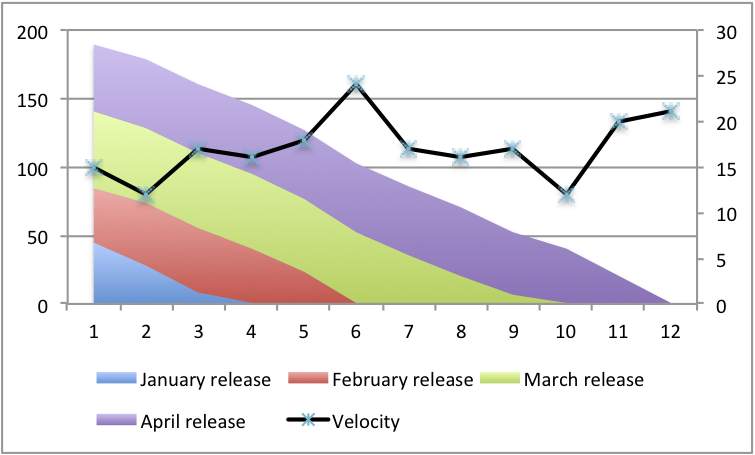
I’d like to conclude this Burn-down chart mini-series (Burn-downs are not just for Sprints and Advice for creating burn-down) by showing a variation on the classical burn-down chart I created with one of my Cornish clients. I’ve recently been advising an SOA project at another client to adopt a similar approach.

In fact, I’m finding this variation makes even more sense then the original, this is the Layered burn-down chart, here is an example:

I’ve redrawn this example to remove client details. What it shows are three things:

  • First the classic burn-down, just look at the overall line declining.
  • Second the velocity line as described in my earlier blog
  • Third the different colours layers show different releases, let me explain…

This company had taken the product backlog and divided it into monthly releases: November, December, January and so on. By the way this was physical on cards and each month’s cards were held together with a bulldog clip.

The contents of a release can – and would – change. But the company felt it knew what it wanted and since the team knew their velocity they could take a stab at which release it would be in. If something new was added the question was simply: when in which release do you want it? And the related stripe on the chart would increase.

That by the way is why the three strips of work yet to do are approximately equal size. If one grew it was obvious, work needed to be removed – either thrown away, or moved to another release, perhaps one that didn’t appear yet.

This was fairly straight forward when the company (thought) it knew everything to be done and ball-pack estimates could be given. With my SOA client they don’t know what the future holds but they can produce a striped chart for the work they do know about. In their case I’m suggesting every stripe represents a requested service rather than a release.

As new services are requested, and estimated, extra stripes can be added to show the total work required. Together with the velocity and slope it should be easy to see when a service will be available to their customers.

Layered burn-down charts Read More »

Advice for creating burn-down – and other capacity measurements

Continuing from my last blog entry (Burn-downs are not just for Sprints) I’d like to offer some advice on the subject, burn-downs, cumulative flow diagrams, velocity, etc..

1) Don’t track hours. Hours are input and its better to measure outputs. Hours are subjective, see my Humans can’t estimate tasks blog. Worse still we have too many psychological hang-ups about hours to make them usable. Instead you want your own currency, call them story points, abstract points, nebulous units of time or what ever you like. Having your own currency allows it to adjust to your team.

Each team has its own currency. Its like having the dollar, euro and pound. They all float independently, there is an exchange rate but it changes.

2) Draw your graphs by hand, process your data by hand. Get a feel for your data. Unless you have a feel for the data and an understanding of how it comes to be you can’t reason about it.

When I say “by hand” I allow you to use Excel (or similar), graph paper is better, but whatever you use don’t use a tool like Rally, Version One, etc. because you won’t have a feel.

Jack Kilby, co-inventor of the silicon chip and pioneer of the electronic calculator, lamented that his invention(s) deskilled engineers. Before the calculator engineers used a slide rule, this meant the engineers needed to know where to put the decimal point. They needed a feel for the data. Kilby lamented that the calculator meant engineers didn’t have the same intuition because of the calculator and led them to make mistakes elsewhere.

4) Use estimated data, forget actuals: estimates and actuals are apples and oranges, or rather, they are future facing estimates and retrospectives estimates.

Estimate tasks just before you do them (e.g. iteration planning meeting), put ball-park estimate on stories which you aren’t going to do any time soon (i.e. later than this iteration), and use averages for really long term stuff.

When you break the stories into tasks, or epics into stories, don’t expect the numbers to match. In fact, you might want to track the variation for longer range forecasting.

5) From 2 & 4: if you have a time-tracking/time-sheeting system leave it to one side, let it exist in its own little fantasy bubble. Don’t use the data, its toxic – see my entries on Capers Jones work. Live by your velocity measurements and charts.

Ultimately, burn-downs are about capacity measurement: John Seddon in Freedom from Command & Control talks about creating capacity measurement charts within organisations. The various graphs we use in Agile are our version of capacity measurement. Accepting its about capacity measurement means its not about targeting. Targeting is wrong see my entry form last year – Velocity targeting and velocity inflation – for more about this.

Advice for creating burn-down – and other capacity measurements Read More »

SimpleBurnDown.png

Burn-downs are not just for Sprints

One of the key tools in Agile is: make things visible. When you can see the thing you can share the thinking and reason able it.

Capacity charts – usually burn-down, burn-up or their cousins Cumulative Flow Diagrams – are amazingly useful things. They show you the state of a development effort. They show this in data. Data by itself is hard to reason with but put it in a graph and wonderful things happen.

It has recently come to my attention that what I thought was obvious about these charts isn’t. So this blog entry, and maybe a few more to come, I plan to discuss charts, and specifically burn-downs, in a bit more depth,

I always encourage, sometime coerce, teams into produce some graphical tracking of their work. For someone like me who’s favourite tool is an spreadsheet this is a piece of cake. But have to remind myself that not everyone finds this so easy.

Importantly there are two burn-down charts you might want to create: a Sprint burn-down and A Product Burn-down. It should be immediately obvious that these correspond to the Sprint Backlog and the Product Backlog.

Just to be clear:

  • Sprint based burn-down chart which shows the progress in the current sprint towards completion of all scheduled work and shows work on a day-to-day basis.
  • Product based burn-down chart which shows progress through some larger quantity of work, e.g. project, release, milestone. These are updated on a sprint to sprint basis.

Superficially both types of chart look the same, the difference is in the X-axis – Sprint based charts have days, product based ones have iterations. An example will help:

Now I’ve never found sprint based burn-down charts very helpful. Perhaps because my background is working on large development efforts which take months or even years to deliver I rarely see an actual delivery at the end of a sprint. We may have something to show but its only a step on the way to something bigger.

Or perhaps its the economist or statistician in me, trained never to read too much into one set of data figures, and I know we can all have bad days, so I don’t see the point of acting when yesterdays velocity falls.

But I know some people do find value in sprint burn-down so I don’t object if you want one.

However, I always see Product Burn-down charts as vital.

Except on the smallest pieces of work there will be something coming next and a product burn-down can give a good sense of context, overall progress and, most importantly, when you could be finished – especially important on large pieces of work. Armed with this information you can construct sensible release plans.

I recently came across two teams at different companies who had burn-down charts but the charts only covered the iteration (sprint). This seemed wrong to me, it doesn’t tell me much. On closer examination the explanation become clear: the product backlog for both teams wasn’t in a state you could use for a burn-down.

Now if you are taking a truly evolutionary approach this isn’t a problem, you re-evaluate iteration-to-iteration. But actually, few teams take a completely evolutionary approach and these two teams where far closer to the iterative style (i.e. they had original requirements documents to work from).

The lack of a longer-term burn-down was a problem and a sign of a bigger problem.

One enhancement I like to make is adding velocity to the burn down chart. Take this one for example:

This adds a second axis (in Excel you have to hunt around for this option) which allows you to see the team velocity sprint-on-sprint.

The key thing is, without this data, velocity and burn-down – and the graphs to understand it – each sprint exists in isolation. That might be OK if you are delivering every sprint and you don’t need to peek into the future. But the kind of work I see does need to look forward and this information is essential.

Finally, I’ve most of what I’ve said about burn-downs applies equally well to cumulative-flow-diagrams (CFDs). In fact I prefer CfDs and readily use them over burn-downs because they help show how work increases. However, I have also discovered that CFDs are not only harder to construct and update but also harder to explain to people. There is something obvious about burn-downs.

Anyway, you pays your money, you takes your choice. Its up to you.

Burn-downs are not just for Sprints Read More »

Propogation delays

Propagation delays occur when there is a chain reaction, a sequence of reactions which take time to work down the chain. Think of a line of traffic waiting at the red light. The light turns green: the driver of the first car doesn’t move instantaneously, it takes a moment to registers the change, perhaps move the car into gear or take the hand break off, moment to press the accelerator and a moment for the engine to start moving the car.

The second car in the line might be watching the traffic light but they are also watching the car in front. Only when the break lights (if on) go off and the car begins to move can they move. And so on.

It takes time for the change to work its way down the line.

The same thing happens in integrated circuits, silicon chips. Even electrons take time to move. Reducing propagation delays is one of the ways chips get to go faster.

Once you know about propagation delays you start seeing them everywhere. Increasingly I not only see them in software development teams but I talk about them. But not everyone knows the concept, hence this blog.

Propagation delays occur when one team, or one developer, changes some code, or perhaps a database schema, and it takes time for all the other team members to update their code base and make any resulting changes.

Propagation delays occur when a company decides to start doing something, or stop doing something, and it takes time to work down the chain and to actually stop or start.

Propagation delays cause tension because different people, or teams, are working to different assumptions.

As with chips and traffic reducing propagation delays can speed things up.

Propogation delays Read More »

Updates for Dialogue Sheets

Two dialogue sheet updates today.

Firstly I’ve created a mailing list to make announcements about dialogue sheets and for discussions about the use of dialogue sheets. This list is open to all and is hosted on Google groups (so you need a Google account).

Second, I’ve uploaded a new dialogue sheet. Another retrospective sheet this one is designed for use at the end of training course. I’ve used it at the end of several Software Strategy Agile training course and it has been well received. This sheet fulfils three purposes:

  • It allows participants to experience a retrospective
  • It provides for a retrospective on a training course at the end of the course
  • It introduces dialogue sheets as a technique for retrospectives

Although the sheet was intended specifically for use at the end of an Agile training course there is little that is specific to Agile in it. I’d really appreciate feedback from other trainers who try this sheet.

As usual, all this is at www.dialoguesheets.com.

Updates for Dialogue Sheets Read More »